
Maps, Navigation & Directions
Universal NavMaps & Navigation
4.0452.00 Reviews
- Version
- 1.71
- Installs
- 5.00M
- Age Rating
- Everyone
Screenshots
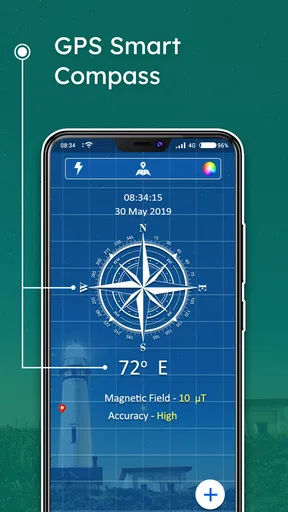
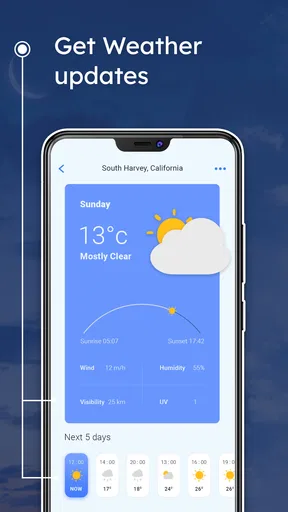

Our Review of Maps, Navigation & Directions
 Analysis by Appyee
I often judge a navigation app less by how it behaves on a familiar commute and more by whether I can trust it when plans change. A shared phone in the car, a visitor looking for the right entrance, or a route through an area with patchy service all put different demands on a map. Maps, Navigation & Directions is worth considering for people who want a free navigation option with offline use, but I’d treat it as a practical aid rather than assume it replaces every established map service.
When one phone has to serve several people
In a household, the person holding the phone is not always the person who planned the journey. One person might choose the destination while another drives, or a passenger might need to check a route while the driver keeps their attention on the road. In that setting, a clear map and spoken directions can make a shared device easier to use than trying to read a screen from the passenger seat.
I’d prepare the route before setting off rather than passing a phone around once the car is moving. The useful habit is simple: agree on the destination, check the route while parked, and let the driver focus on driving. Voice guidance can help with turns, but it does not make it sensible for the driver to adjust settings or search for places on the move.
Set up the phone around the trip
Offline maps are most valuable when they are treated as preparation, not an emergency button. Before a trip, I would download the area while connected, then check that the map covers the places I expect to visit—not just the first destination. A route that crosses a regional boundary, for example, may need more than one area saved. This small check is particularly useful before rural drives or travel through places where mobile data may be unreliable.
There is also a trade-off to keep in mind: an offline map can preserve basic access to mapped roads, but live information depends on a connection. If traffic conditions are central to a time-sensitive trip, I would check that the phone has service and compare the suggested route with current conditions before leaving. Offline coverage is a safety net for connectivity, not a promise that every connected feature will behave the same way without internet.
The app is free and is developed by Universal Nav. It has an average rating of 3.8 from around 13,000 ratings, with more than 5 million installs. Those figures suggest that plenty of people have tried it, while the rating also gives me reason to approach it with sensible expectations rather than assume every feature will suit every driver. The current version is 1.58, and it is rated for Everyone.
Coordinate without turning navigation into a distraction
For a family errand run, I’d use the app to settle the route before departure: enter the main destination, look for a suitable stop such as a gas station, then decide whether it belongs on the trip before moving. That is more dependable than searching for a convenient stop at the last minute. If a passenger is helping, they can handle changes while the driver watches the road, but it is still worth agreeing on the next stop aloud so everyone understands where the car is going.
For shared-device use, the phone’s normal account and privacy boundaries matter. I would not assume the navigation app separates one household member’s searches from another’s or offers dedicated family profiles. If several people use the same device, consider whether saved searches and recent destinations are appropriate for everyone who can open it. Clearing or reviewing device history is a general phone-management choice, not a navigation feature I would rely on the app to provide.
Age, trust, and the right level of supervision
The Everyone content rating makes the app suitable for a broad audience, but that is not the same as making independent navigation a good idea for every age. A younger passenger can learn to follow a route with an adult, while the adult remains responsible for decisions and road safety. I would not hand a child the phone and treat turn-by-turn guidance as a substitute for supervision, especially in an unfamiliar area.
Navigation also deserves a little skepticism. A suggested route is useful advice, not an instruction that overrides road signs, closures, or local conditions. If a direction sounds wrong, I would slow down where safe, check the surroundings, and choose the legal route rather than make a sudden turn to obey the screen. That matters whether the map is online or downloaded.
Getting Started with the App
The first thing that caught my eye was the app’s clean interface. It’s like stepping into a neatly organized room where everything is where you expect it to be. You can tell that usability is a top priority. After downloading it from the store, the setup was a breeze. The app guided me through enabling location services, and I was ready to hit the road.
Features That Stand Out
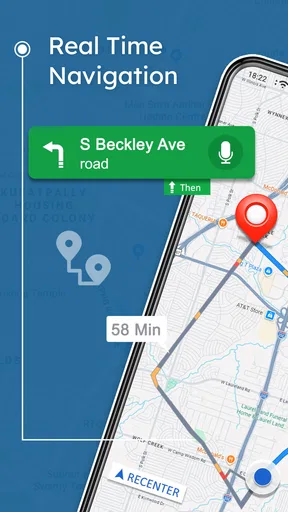
One of the coolest features of Maps, Navigation & Directions is its voice-guided navigation. Imagine having a friendly co-pilot who knows the streets better than anyone else. The voice instructions are clear and timely, ensuring you don’t miss that crucial left turn.
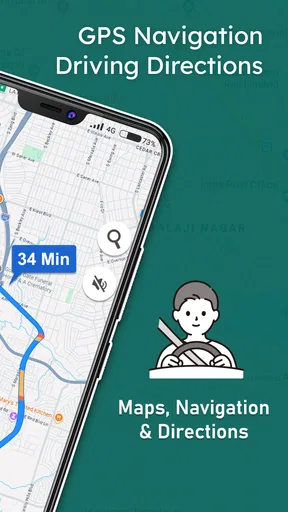
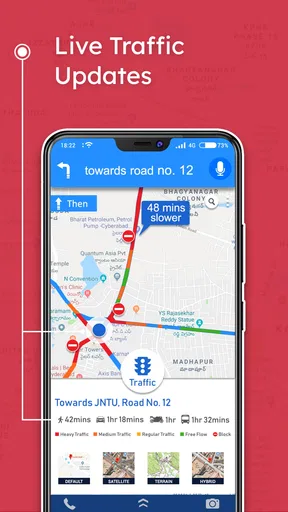
Another feature that I found incredibly useful is the real-time traffic updates. Whether you’re commuting to work or heading out for a weekend getaway, the app provides detailed traffic data. It helps you avoid congested areas, saving both time and sanity.
The app also shines with its offline map capability. You can download maps for entire regions, which is a lifesaver when traveling without a reliable internet connection. I’ve used this feature on a recent trip, and it worked like a charm.
User Interface and Experience
Let’s talk about the user interface. The design is sleek and intuitive. Navigating through the app is smooth, and the maps are clear and easy to read. You can switch between different views, such as satellite or terrain, which adds a nice touch to the overall experience.
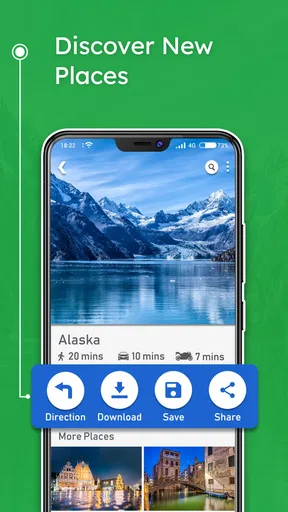
I must say, the search function is robust. You can find anything from the nearest gas station to that hidden gem of a restaurant your friend recommended. The app also offers suggestions based on your search history, making it feel personalized.
Compatibility and Performance
The app runs seamlessly on both Android and iOS devices. I’ve tested it on a couple of different phones, and there were no hiccups. It’s lightweight, and the loading times are impressively quick. Even on older devices, the performance remains solid.
Battery consumption is always a concern with navigation apps, but I was pleasantly surprised. The app is optimized to use minimal resources, ensuring your phone doesn’t run out of juice halfway through your journey.
Choosing it over familiar map apps
Against the usual navigation choices, I see this app’s clearest appeal in its combination of route guidance and offline maps. If I already depend on another map app for saved places, shared destinations, or a familiar local workflow, I would not switch solely because this one can navigate offline. I’d try it on a short, low-pressure journey first and see whether its search results and directions fit my habits.
For someone who mainly needs a route and wants a map available when connectivity is uncertain, it may be a sensible alternative. For a tightly scheduled city trip where changing traffic is the deciding factor, I would give more weight to whichever app provides the most dependable current traffic information in that location. The practical comparison is not about which map has the longest feature list; it is whether the route, search results, and connection conditions match the journey in front of you.
Small checks that make a real difference
Before relying on offline navigation, I would open the saved map while still connected and confirm the destination is visible. I’d also keep the phone charged and mounted where the driver can glance at it without reaching or looking away for long. These are ordinary preparations, but they address the most common weak points of phone navigation: an incomplete saved area, a flat battery, or a distracting setup.
Search history can make repeat searches feel quicker, but it can also surface a previous destination when several people use one phone. I would pause to verify the address rather than tap the first familiar suggestion, especially if two places share a name. Similarly, map views are useful for orientation, but switching views while driving is a task for a passenger or a parked stop.
A realistic example is a weekend visit to a relative in a neighborhood I do not know. I would search for the exact destination at home, save the relevant map area, and check the route before leaving. If traffic is heavy, I would review the live route while connected; if service drops along the way, I could still refer to the downloaded map. On arrival, I would follow local signs and the actual entrance rather than assume the map pin tells the whole story.
Who will appreciate it—and who may prefer another option
I can see this being useful for occasional travelers, drivers who want offline map access, and households that need a straightforward route tool on a shared phone. It is less compelling for someone whose daily routine depends on a particular ecosystem of saved locations and collaborative planning, or for a driver who needs consistently strong live traffic detail to make time-critical decisions. In those cases, a familiar alternative may be easier to trust because its existing workflow already suits the user.
One natural question is whether the app costs anything to try: it is free. Another is whether an older device can install it; the minimum operating system is version 8.0. I would still check the phone’s available storage before downloading offline areas, since map files take space, and keep the operating system and app compatible with the device. The app was released on May 23, 2019, so its version history has had time to develop, but I would judge it by how it performs on my own phone and in the places I travel.
Another reasonable question is whether offline use gives the same experience as being connected. I would not plan on that: saved maps are useful when data is unavailable, while traffic updates and other information that depends on a live connection are best checked online. If the route is unfamiliar or safety-critical, I would also keep a second source of orientation available, such as road signs or a passenger’s overview, rather than treating any single app as infallible.
Final Thoughts
Overall, the Maps, Navigation & Directions app is a reliable companion for anyone who spends a lot of time on the road. It combines essential navigation tools with user-friendly features, making it a must-have app for your smartphone.
Whether you’re a daily commuter or an occasional traveler, this app offers everything you need to navigate with confidence. Just grab your phone, fire up the app, and you’re ready to explore new places without getting lost.
So, next time you’re planning a trip or just heading to a new part of town, give Maps, Navigation & Directions a try. It might just become your new favorite travel buddy!
My household verdict
I would be comfortable keeping this as a backup or everyday option when offline map access matters, especially if a passenger can help with route changes. I would not make it the only plan for a complex, time-sensitive drive until I had tested its coverage and directions locally. The most sensible approach is to prepare the map, check the route, and let the driver stay focused.
For a shared household phone, its broad age rating and straightforward navigation make it approachable, but they do not replace household judgment about search history, device access, or supervision. If those boundaries are handled on the phone itself and expectations are clear, the app can be useful without pretending to provide family coordination tools. That is the balance I would recommend to a friend: try it for the routes where its offline strengths help, and keep a familiar alternative available when live conditions or established sharing habits matter more.
Verdict
Strengths of Maps, Navigation & Directions
- User-friendly interface for easy navigation.
- Real-time traffic updates enhance travel planning.
- Offline maps available for data-free access.
- Detailed voice-guided directions for convenience.
- Multiple route options to choose from.
Limitations of Maps, Navigation & Directions
- Consumes significant battery during use.
- Ads can be intrusive in free version.
- Occasional GPS inaccuracies reported.
- Requires large storage space for offline maps.
- Limited customization for map themes.
Similar Picks in This Category
View All
Uber - Request a ride
Uber Technologies, Inc.4.7


inDrive. Rides with fair fares
® SUOL INNOVATIONS LTD4.8

Yandex Go: Taxi Food Delivery
Mikromobilnost LLC Belgrade4.8

Bolt: Request a Ride
Bolt Technology4.8

Rapido: Bike-Taxi, Auto & Cabs
Rapido Bike Taxi4.8
Frequently Asked Questions
What features does the Maps, Navigation & Directions app offer?
The app provides real-time GPS navigation, live traffic updates, and turn-by-turn voice guidance. It includes features like offline maps, route planning, and the ability to search for nearby points of interest such as restaurants and gas stations. Additionally, it offers street view and satellite imagery for a comprehensive navigation experience.
Is the Maps, Navigation & Directions app available offline?
Yes, the app allows users to download maps for offline use. This feature is particularly useful for traveling in areas with poor or no internet connectivity. Users can select specific regions or cities to download, ensuring they have access to crucial navigation features without needing a data connection.
How accurate is the real-time traffic feature in the app?
The app uses real-time data from multiple sources to provide accurate traffic updates. It analyzes current traffic conditions to suggest the fastest routes and alerts users to any accidents or road work. While generally reliable, accuracy can vary based on location and data availability.
Does the app support public transportation routes?
Yes, the app includes public transportation options for major cities worldwide. Users can view schedules, routes, and estimated travel times for buses, trains, and subways. This feature is designed to help users plan their trips efficiently, though availability may vary depending on the city or region.
Is the Maps, Navigation & Directions app free to use?
The app is free to download and use, offering a range of features at no cost. However, there might be in-app purchases or subscription options for advanced features such as ad-free usage, premium map updates, or enhanced navigation tools. Users can choose whether to upgrade based on their needs.
